The streaming wars have hit a new fever pitch, and for anyone looking to ditch traditional cable, the choices can feel overwhelming. Two titans stand out in the live TV arena, each vying for your monthly subscription: YouTube TV and the compelling bundle offered by Hulu with Live TV, which famously includes Disney+ and ESPN+. It’s not just about channels anymore; it’s about value, user experience, and whether your chosen service truly replaces your old cable box without breaking the bank.
This isn't just a simple channel count; it’s a deep dive into how these services stack up against each other in the real world, comparing everything from their core offerings to the subtle differences that make one a better fit for your specific viewing habits. Are you a sports fanatic who lives for game day? Or perhaps a movie buff and TV show enthusiast whose priorities lie in a vast on-demand library? Let's unpack the comparison: YouTube TV vs. Disney+ & Hulu Bundles, especially focusing on their live TV capabilities, to help you make an informed decision.
At a Glance: YouTube TV vs. Hulu with Live TV
Deciding between these two heavyweights boils down to a few key priorities. Here's a quick cheat sheet:
- Price Parity: Both services will cost $83/month. Hulu with Live TV increased in October, and YouTube TV will follow suit in January 2025.
- On-Demand Value: Hulu with Live TV includes a robust on-demand library from Hulu, Disney+ (ad-supported), and ESPN+ in its base price, making it a powerful entertainment bundle. YouTube TV focuses primarily on live content.
- Sports Focus: YouTube TV generally offers a superior experience for dedicated sports fans, with features like Multiview, Key Plays, NBA TV in the base package, and discounted NFL Sunday Ticket. Hulu with Live TV includes NFL Network but lacks NBA TV in its standard offering.
- User Experience: YouTube TV is often praised for its clean, intuitive interface and seamless navigation. Hulu with Live TV integrates live TV into its existing on-demand app, which can sometimes lead to a less direct experience and occasional confusion between on-demand and DVR recordings.
- Simultaneous Streams: YouTube TV offers 3 simultaneous streams standard. Hulu with Live TV provides 2, with an upgrade option for unlimited home streams.
- DVR: Both offer unlimited cloud DVR storage for up to nine months, allowing fast-forwarding through commercials.
The Cord-Cutting Landscape: Live TV's New Frontier
For years, the promise of cutting the cord was simple: pay less, watch what you want. But as streaming services have proliferated, many have realized that entirely foregoing live television isn't feasible for everyone. Whether it's catching local news, live sporting events, or appointment viewing for a favorite show, live TV still holds a crucial place.
Enter YouTube TV and Hulu with Live TV. These services aren't just collections of channels; they're comprehensive cable replacements designed to mimic and often improve upon the traditional TV experience. They're built for the modern viewer, offering a vast array of live channels, local stations, and convenient DVR capabilities, all delivered over your internet connection. They’ve evolved beyond just channel numbers, focusing on features that enhance the viewing experience.
Interestingly, despite their comprehensive offerings, neither YouTube TV nor Hulu with Live TV is universally considered the absolute "best overall" live TV streaming service. That title is often debated, with Sling TV frequently cited for its customizability and lower price points, albeit with fewer channels. But for a full-fledged cable replacement with a robust channel lineup, these two are almost always at the top of the list.
Price Tag Parity: The $83 Question
Let's address the elephant in the room: cost. In the ever-shifting landscape of streaming service pricing, it’s rare to see such direct alignment. As of late 2024 and early 2025, both YouTube TV and Hulu with Live TV will set you back approximately $83 per month.
Hulu with Live TV raised its price to $83/month in October, while YouTube TV is scheduled to increase its monthly fee to $83/month in January 2025. This means that the once-slight price difference has largely vanished, shifting the decision-making process squarely onto features, channel lineups, and user experience rather than cost savings alone. This newfound parity makes a deeper dive into their individual strengths even more critical.
The Foundation: Core Similarities and Shared Strengths
Before we highlight their differences, it’s worth noting the many excellent features both YouTube TV and Hulu with Live TV share. These are the cornerstones of a good cord-cutting experience:
- Local Channels: You’ll find all four major broadcast networks (ABC, CBS, Fox, NBC) in most areas, along with CW, MyTV, and PBS affiliates. This is a huge win for anyone worried about losing access to local news, prime-time network shows, and major sporting events.
- Unlimited Cloud DVR: Both services offer a fantastic, truly unlimited cloud-based DVR. You can record as much as you want, and your recordings will typically expire after nine months. Crucially, both allow you to fast-forward through commercials on recorded content, a feature many cable DVRs used to lock down.
- Team Tracking: For sports fans, both platforms let you 'follow' your favorite teams, making it easy to track upcoming games and ensure you don’t miss any action.
- Picture Quality: Live TV streams generally range from 720p to 1080p, depending on the channel and your internet connection. Neither service includes 4K live streams in their entry-level plans, though YouTube TV does offer it as an add-on.
- Regional Sports Networks (RSNs): This is a shared weakness. Neither YouTube TV nor Hulu with Live TV are strong contenders for RSNs like YES, NESN, or Bally Sports. If these local sports channels are a must-have for you, services like Fubo, DirecTV Stream, or DirecTV MySports are generally better options.
Diving Deeper: Where YouTube TV Shines Brightest
If you're a dedicated sports enthusiast or someone who values a sleek, intuitive interface above all else, YouTube TV often comes out on top. It feels like a platform built from the ground up for modern live TV viewing.
The Sports Lover's Paradise
YouTube TV has meticulously crafted an experience tailored for sports fans, offering features that genuinely enhance game day:
- Built-in Sports Channels: The base package includes both NFL Network and NBA TV, crucial channels for many professional sports followers.
- NFL Sunday Ticket & RedZone: YouTube TV is the exclusive home for NFL Sunday Ticket, offering it at a discounted rate to subscribers. It also provides NFL RedZone, either as an add-on or bundled with its Sports Plus package. This alone can be a game-changer for football fanatics.
- Innovative Features:
- Multiview: This is arguably YouTube TV's killer feature. For select sports, you can watch up to four games simultaneously on a single screen, a dream come true for fantasy sports managers or multi-game weekends.
- Key Plays: If you tune into a game late, "Key Plays" allows you to quickly catch up on the biggest moments without having to scrub through the entire recording.
- Data-Driven Content: Access real-time scores and stats right within the interface, deepening your engagement with the games.
A Slicker Stream: User Experience and Interface
One of YouTube TV's most lauded aspects is its user experience. It's generally considered easier to use, more streamlined, and incredibly responsive:
- Intuitive Interface: The home screen offers personalized recommendations and easy access to your live guide, library, and on-demand content. It feels less cluttered and more purpose-built for live viewing.
- Seamless Navigation: Fast-forwarding and rewinding are smooth, with no reported issues distinguishing between on-demand versions and your DVR recordings. The picture quality rates are also clearly visible on-screen, so you always know what you're getting.
- Reliability: Users often report fewer buffering issues and a more consistent streaming experience compared to some competitors.
Channel Lineup Snapshot: What You Get (and What You Don't)
YouTube TV claims to offer over 100 channels in its base package. CNET, in its analysis, found it carries 78 out of the top 100 channels.
Notably Included:
- All major broadcast networks (ABC, CBS, Fox, NBC, CW, PBS).
- ESPN, Fox Sports, CBS Sports.
- CNN, Fox News, MSNBC.
- TNT, TBS, FX, FXX, USA.
- NFL Network, NBA TV.
It's worth noting that while YouTube TV typically carries Disney-owned networks like ABC and ESPN, past contract disputes have occasionally disrupted this. For the latest on such agreements, staying informed about a Disney and YouTube TV update can be crucial. These disputes are usually resolved quickly, but they highlight the dynamic nature of streaming agreements.
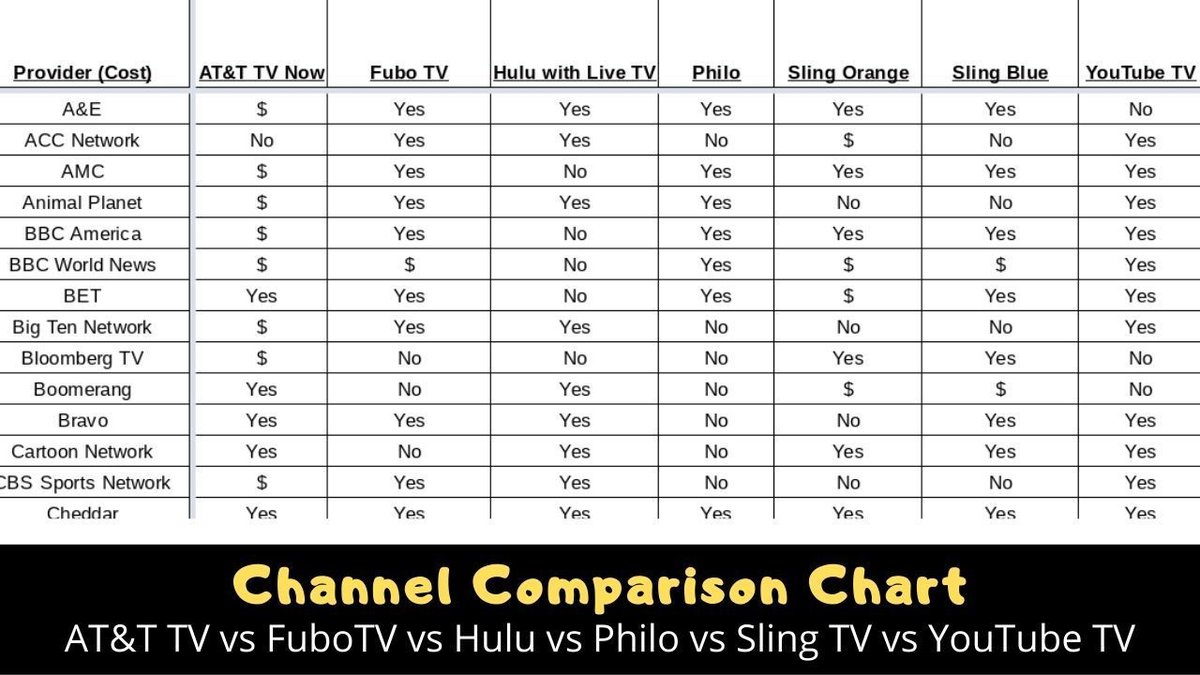
Notably Missing: - A&E, Lifetime, The History Channel (key channels for many lifestyle and documentary viewers).
- MLB Network (a surprising omission given its sports focus).
- Vice.
If these missing channels are crucial for your viewing habits, it’s a point to consider carefully.
Diving Deeper: Where Hulu with Live TV Dominates
Hulu with Live TV carves out its niche by offering unparalleled value through its integrated bundle. If your ideal entertainment setup involves a vast on-demand library alongside your live TV, this is likely your top contender.
The Ultimate On-Demand Bundle
This is Hulu with Live TV's strongest selling point and where it truly differentiates itself:
- Integrated Streaming Powerhouses: The base $83/month price includes not just live TV, but also the full, ad-supported on-demand libraries of Hulu, Disney+, and ESPN+. This bundle, if purchased separately, is valued at approximately $35.99/month, adding significant value to the live TV offering.
- Hulu Originals: You get access to Hulu's acclaimed original series, movies, and a deep catalog of current and classic TV shows.
- Disney+ Content: Enjoy everything Disney, Pixar, Marvel, Star Wars, and National Geographic has to offer, from blockbuster movies to heartwarming family content.
- ESPN+ Exclusives: Beyond the live ESPN channels, ESPN+ provides exclusive live sports, original series, and documentaries (like the full "30 for 30" library).
This makes Hulu with Live TV ideal for households with diverse viewing interests, covering everything from family entertainment to serious binge-watching.
Unique Channel Considerations
Hulu with Live TV claims over 95 "top channels." CNET, in its comparison, noted it carried 75 out of the top 100 channels.
Unique Feature:
- East and West Coast Feeds: For select channels like Cartoon Network, TBS, TNT, and Discovery, Hulu with Live TV offers both East and West Coast feeds. This is great for night owls or early birds who want to catch prime-time shows at a different hour.
Notably Included: - All major broadcast networks (ABC, CBS, Fox, NBC, CW, PBS).
- ESPN, Fox Sports, CBS Sports.
- CNN, Fox News, MSNBC.
- TNT, TBS, FX, FXX, USA.
- A&E, Lifetime, The History Channel (channels missing from YouTube TV).
- NFL Network.
Notably Missing: - Univision (a significant omission for Spanish-language viewers).
- AMC, BBC America, IFC, Sundance TV (key channels for prestige dramas and indie films).
- MTV Classic, MTV 2.
- NBA TV (a big drawback for basketball fans).
- NBC Sports (though other NBC channels are present).
User Experience: The Integrated Approach and Its Quirks
Hulu with Live TV's user experience is a bit of a mixed bag. While it has a brighter, more modern look, the integration of live TV into the existing Hulu on-demand app can lead to some navigation challenges:
- "Live" Tab: Live TV is accessed via a dedicated "Live" tab within the main Hulu app. While functional, it can feel less direct than YouTube TV's more live-TV-centric design.
- Potential Buffering: Some users have reported occasional buffering issues, though this can often depend on individual internet speeds and device capabilities.
- Ad Breaks and DVR Confusion: One common complaint is difficulty rewinding through certain ad breaks. There can also be confusion between playing an ad-supported on-demand version of a show and the full, ad-skippable DVR recording, which can be frustrating.
- Picture Quality Info: Unlike YouTube TV, Hulu with Live TV doesn't typically display on-screen information about picture quality rates, which can leave you guessing. Mobile feeds, in particular, can sometimes appear lower-resolution.
Side-by-Side: Key Feature Showdown
Let's break down some critical features where these two services often diverge.
Simultaneous Streams
- YouTube TV: Your base subscription allows for 3 simultaneous streams. If you need more, the 4K Plus add-on (priced around $9.99/month or $20/month depending on current offers) can also provide unlimited streams at home, plus 3 on the go.
- Hulu with Live TV: The standard plan offers 2 simultaneous streams. For an additional $10/month, you can upgrade to unlimited streams at home, plus 3 on the go.
If you have a large household with many simultaneous viewers, these upgrade options are important to consider.
DVR Capabilities
Both services offer excellent DVR features, largely mirroring each other:
- Unlimited Cloud Storage: Record as much as you want without worrying about space.
- Nine-Month Expiry: Recordings are typically saved for nine months.
- Commercial Skipping: Both allow you to fast-forward through commercials on your recorded content, a feature that significantly enhances the viewing experience.
The main difference here often comes down to the user interface for accessing and managing these recordings, where YouTube TV typically offers a slightly smoother experience.
Add-ons and Extras
Both platforms allow you to expand your channel lineup or features with various add-ons.
- YouTube TV:
- Sports Plus ($10.99/month): A robust package including 14 channels like NFL RedZone, beIN Sports, Fox Soccer Plus, FanDuel TV, and more.
- 4K Plus ($9.99 - $20/month): Unlocks 4K resolution for select live and on-demand content, offline downloads, and unlimited simultaneous streams at home.
- Numerous other premium channel add-ons (e.g., HBO Max, Showtime, Starz).
- Hulu with Live TV:
- Sports Add-on ($9.99/month): Includes 6 channels such as NFL RedZone, MAVTV, FanDuel TV, and others.
- Unlimited Screens Add-on ($10/month): As mentioned, allows unlimited streams at home.
- Various premium channel add-ons (e.g., HBO Max, Showtime, Starz).
Comparing the sports add-ons, YouTube TV's Sports Plus offers a broader selection of channels, which might appeal more to diverse sports interests beyond just the NFL.
Making Your Choice: Which Stream is Right for You?
With prices now essentially equal, your decision hinges entirely on your viewing priorities and preferences.
Are You a Sports Fanatic First?
If your weekend revolve around game schedules, live stats, and catching every crucial play, YouTube TV is likely your champion.
- NBA TV and NFL Network in base: No extra cost for these core channels.
- NFL Sunday Ticket discount: An exclusive perk for football season.
- Multiview and Key Plays: These features are genuinely innovative and enhance the live sports viewing experience in ways Hulu cannot match.
- More comprehensive Sports Plus add-on: A wider array of specialized sports channels.
The cleaner interface also means less fuss when you're trying to jump between games or find specific content.
Do You Crave On-Demand Binge-Watching and Ultimate Bundle Value?
If your streaming life includes extensive movie nights, catching up on critically acclaimed series, and entertaining a household with diverse content needs, then Hulu with Live TV is the clear winner.
- Hulu, Disney+, ESPN+ included: This bundle is the undisputed king of on-demand value. You’re getting three major streaming services for the price of one live TV platform, offering thousands of hours of content beyond just live broadcasts.
- Family-friendly content: Disney+ is a huge draw for families.
- Extensive on-demand library: Hulu's own vast catalog of current and past TV shows, plus its award-winning originals, ensures there's always something to watch.
The slightly less polished live TV experience might be a small trade-off for the sheer volume and variety of on-demand content available.
Prioritizing User Experience and Reliability
If you get frustrated by clunky interfaces, buffering, or confusion between different content types, YouTube TV generally offers a smoother, more reliable, and intuitive user experience. Its design feels more purpose-built for live TV, making navigation effortless.
Hulu with Live TV, while constantly improving, still has an interface that can feel like live TV was added to an on-demand service, rather than being built into its core.
The "Missing Channels" Factor
Before making a final call, grab a pen and paper (or open a note app) and list your absolute must-have channels.
- If A&E, Lifetime, The History Channel, or AMC are non-negotiable, Hulu with Live TV covers them where YouTube TV does not.
- If NBA TV or MLB Network are essential, YouTube TV offers NBA TV in its base, but misses MLB Network entirely. Hulu with Live TV misses NBA TV.
- If Univision is crucial, Hulu with Live TV does not carry it.
This simple exercise can often immediately highlight which service aligns better with your household's unique viewing needs.
Common Questions & Clarity
Let's tackle some frequently asked questions about these services.
What about 4K streaming?
Currently, neither YouTube TV nor Hulu with Live TV offer 4K live streams in their standard plans. YouTube TV provides a "4K Plus" add-on for an additional monthly fee, which unlocks 4K resolution for select live sports and on-demand content. However, native 4K live broadcasts are still relatively rare across all streaming platforms. Most content will be in 720p or 1080p.
Can I get local channels?
Yes, both services offer all four major broadcast networks (ABC, CBS, Fox, NBC) in most areas, along with CW, MyTV, and PBS affiliates. Local channel availability can sometimes vary by exact geographic location, so it's always wise to check their websites with your ZIP code before subscribing.
Is one better for families?
For families with diverse interests, especially those with kids, Hulu with Live TV generally presents a stronger value. The included Disney+ subscription offers a vast library of child-friendly and family-oriented content, alongside Hulu's own entertainment and the live TV channels. YouTube TV is perfectly capable for families, but it doesn't offer the same depth of integrated, on-demand family programming.
Beyond the Battle: Other Cord-Cutting Considerations
No matter which service you choose, a few other factors are critical for a smooth cord-cutting experience.
- Internet Speed: Live TV streaming is data-intensive. Ensure you have a stable internet connection with sufficient bandwidth (at least 25 Mbps for a single stream, more for multiple simultaneous users and 4K content).
- Device Compatibility: Both YouTube TV and Hulu with Live TV are widely available on most popular streaming devices (smart TVs, Roku, Fire TV, Apple TV, Chromecast, gaming consoles, mobile devices, web browsers). Verify your preferred devices are supported before subscribing.
- Trying Before You Buy: Both services typically offer free trials. Take advantage of them! This is the best way to test the interface, channel lineup, and overall experience in your own home with your own devices and internet connection.
Your Next Stream Awaits
The choice between YouTube TV and the Hulu with Live TV bundle ultimately comes down to a clear understanding of your personal priorities now that their prices are essentially identical. Are you the avid sports fan who craves every live moment, seamless navigation, and cutting-edge features like Multiview? Then YouTube TV likely holds the winning hand. Or are you someone who values a massive on-demand content library, offering everything from blockbuster Disney movies to acclaimed Hulu Originals and exclusive ESPN+ content, all bundled with your live TV? In that case, Hulu with Live TV is tailor-made for you.
There's no single "best" option here, only the best fit for your unique viewing habits and household needs. Take a moment to weigh what truly matters to you, explore those free trials, and embark on a cord-cutting journey that truly enhances your entertainment.